Give a clear reason
Choose a restaurant-funded welcome offer, direct-only combo or loyalty reward. Set the minimum order, eligible area and cap before inviting customers.
Your own ordering place, next to Zomato and Swiggy
Give your regulars a place to order straight from you, with your name, menu and 0% SP commission on food orders. Keep Zomato, Swiggy or ONDC for finding new customers.
₹0 to preview. No payment, OTP or customer data.
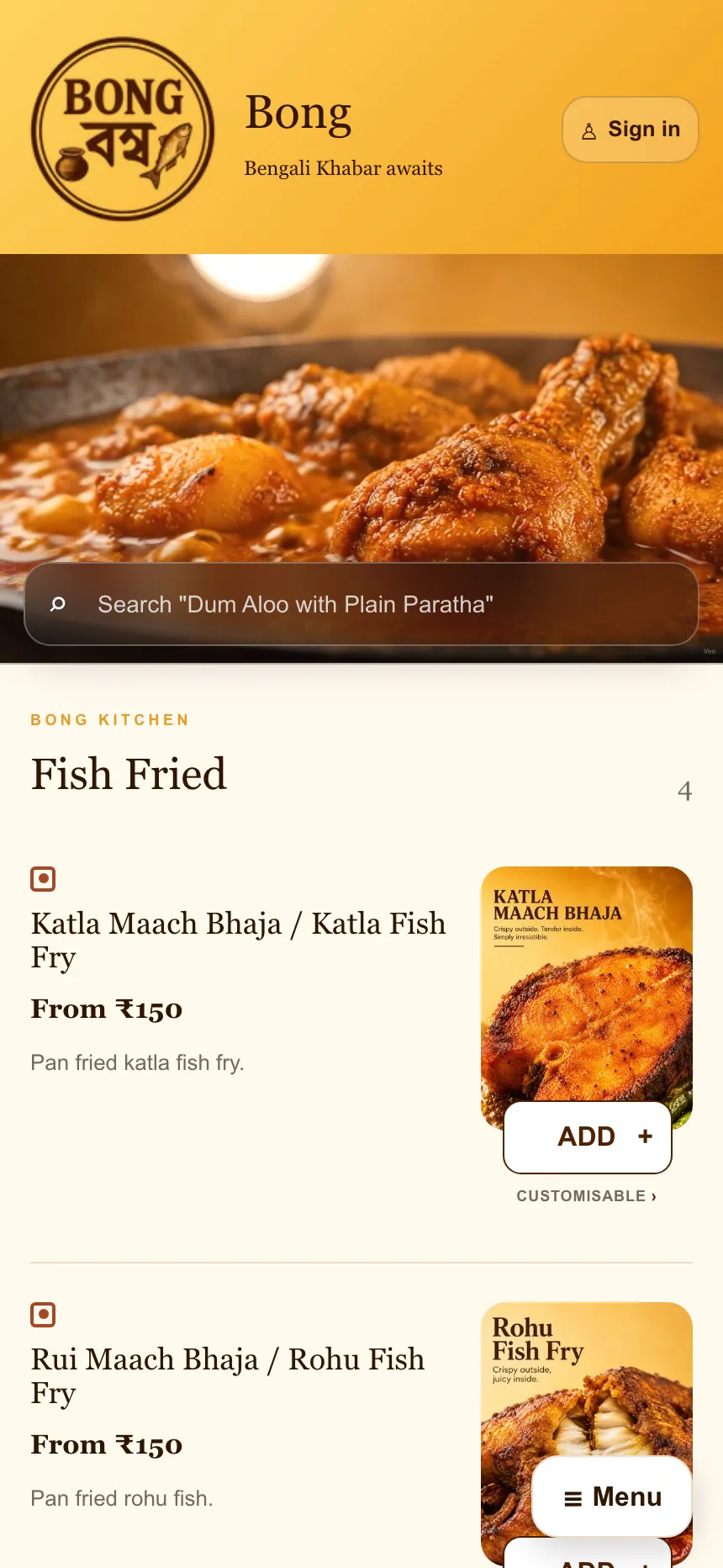
Bong Foods · live client work
Bong Foods runs its restaurant menu on its website and receives direct customer orders in its restaurant workspace. The public case shows the working order flow, not a made-up performance result.
We are tracking direct-order share, repeat ordering and restaurant-funded offer cost. Results will be published only after the owner approves the reporting period; no sales or savings figure is presented as audited.
How regulars switch
Offer. Kit. Measure. Each step is restaurant-controlled and clear about who pays.
Choose a restaurant-funded welcome offer, direct-only combo or loyalty reward. Set the minimum order, eligible area and cap before inviting customers.
Use the included SP Kit: 100 cards, 100 stickers, one counter stand, one staff guide and digital artwork. Artwork goes to print only after owner approval.
Review the menu and order activity available to your restaurant in SP Partner. Any offer cost stays visible as a restaurant decision.
Your own place · SP Partner
A mobile-first ordering website and one browser workspace carry the restaurant’s menu and service workflow together.
Customers see your brand, categories, menu, item options, cart and order updates in your own ordering experience.
Finish onboarding to open the private restaurant workspace. Edit your website and menu before paid activation; production order actions stay gated until launch checks pass.
Open SP Partner →Add categories and as many dishes as you need, change item details and availability, and see saved changes on the connected restaurant site.
Delivery · after activation
The customer sees a delivery charge before paying. After the restaurant accepts an eligible paid order and sets preparation time, the verified connection can request a rider and share status updates.
Confirm the outlet’s approved service area and show the delivery charge before checkout.
The paid order reaches SP Partner. The kitchen accepts it and sets an honest preparation time.
The activated system sends the pickup and delivery details to the approved provider.
Assignment, rider contact, pickup and journey updates stay visible to the restaurant and customer.
Launch checks: automatic rider requests stay off until the provider account, exact pickup details, coverage, charges or funding, secure connection and a successful live booking test are verified. Provider availability and charges remain separate from SP’s fees.
Switched regulars · full cost view
Illustrative only. Edit regulars, order frequency, aggregator share, offers, delivery and payment processing to see the costs side by side.
Start with your own numbers. The sample settings are illustrative and editable.
150 direct orders · ₹75,000 direct-order value
Clear pricing
SP Partner opens after onboarding at no charge. Production activation connects the live restaurant website and provider workflows.
You still pay the monthly fee after the included first live month, payment-provider and delivery charges, taxes, and any offers you fund. Additional outlets beyond three and chain work need a written scope.
Custom · chains
For chains and multi-brand groups, we scope the website and system around your outlets, existing systems and operating standards before quoting.
Share your outlet count, cities, current ordering channels, POS or other systems, and what you want customised. We will confirm the supported scope and milestones in writing.
Questions, answered plainly
No. Keep those channels for discovery. SP gives your regulars another place to order from your restaurant. Check your own marketplace agreements before running a direct-only offer.
SP does not take a percentage of food-order value. You still pay the agreed monthly fee after the included first live month, delivery and payment-provider costs, taxes and any offers your restaurant funds.
The current published fees are ₹14,999 setup plus 11 monthly fees of ₹3,999 after the included first live month: ₹58,988 in year one. Delivery, payment processing, taxes and restaurant-funded offers are separate.
We do not promise a particular order count, saving or payback. Your written scope explains the deliverables, review points, cancellation and refund terms before you pay.
Your restaurant controls its brand, food, prices, order acceptance and customer-facing operation. The service terms explain the deliverables, software licence and the steps for a project exit.
Delivery is connected only where the provider approves the restaurant and area. The customer sees the delivery charge before payment. Provider charges and coverage are separate from SP fees; we do not publish a made-up typical rate.
There is no one-size-fits-all launch promise. The owner and SP complete the domain, payment, delivery, testing and training checks, then approve the launch together.
Production payment is connected to the restaurant’s approved payment account. The provider sets its processing charges and settlement timing; those details are confirmed during activation.
Yes. SP Partner is visible to every user. Finish restaurant onboarding to open your private workspace and edit your restaurant website, categories, items, prices, photos and availability. Production orders and provider actions remain off until activation and checks pass.
Yes. Larger groups use a written custom scope. Tell us your outlets, cities and existing systems through the Help Center; we will confirm what SP can support before quoting.
Need help with your restaurant or account? Open the SP Help Center and live chat →
Who is behind SP
SP Studios builds and supports restaurant-owned direct-ordering websites and the connected SP Partner browser workspace.
Meet the studio →SupportSP Help Center and live chat
Platform CareMonday–Friday · 9 am–6 pm IST
Written scopeFees, milestones and provider gates before production
Contactcontact@thespstudios.com
How it works
One account carries your restaurant from a free preview to the private SP Partner workspace and, when you choose, into production.
Start the restaurant setup. No payment is required for the account or preview.
Add your brand, categories, items, prices and layout. Your draft stays private.
Complete onboarding to open your workspace and keep editing before activation.
Approve the written scope, complete payment and provider checks, test the live journey and approve launch.
Your restaurant, visible first
Create a private working preview first. No payment, OTP, customer data or delivery booking is used in preview mode.
Build my free preview ↗Talk to SP in live chat →